


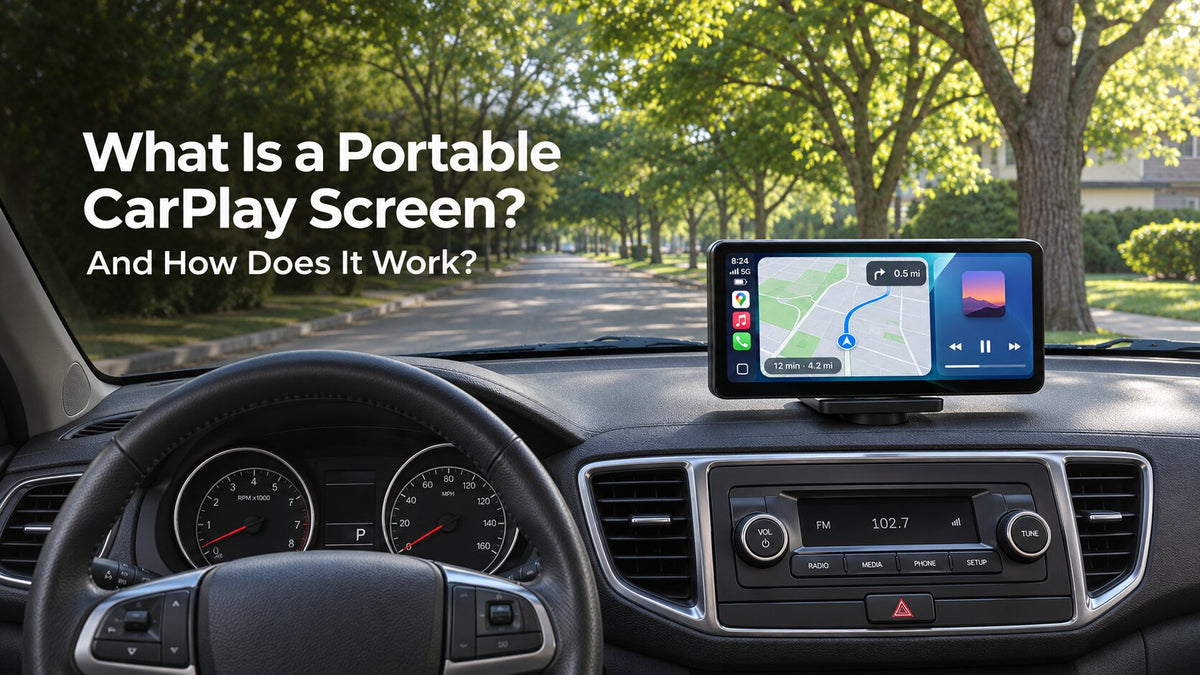
What Is a Portable CarPlay Screen and How Does It Work?
A portable CarPlay screen is a separate display that you mount in your car and connect to a compatible iPhone. It gives you a dashboard interface for supported maps, music, calls, and messages while you keep your factory stereo in place. If your car never came with Apple CarPlay, a portable screen can add it without taking the dashboard apart.
Picture an older car with a working radio and an AUX input. Your iPhone can show turn-by-turn directions on the new screen, and an audio cable can carry those directions to the car speakers. The radio stays where it is. The screen has its own power connection, and the audio comes through whichever output you set up.
What Does a Portable CarPlay Screen Do?
Think of it as a dedicated dashboard display for supported features on your phone. The phone supplies the maps, playlists, and other compatible apps. The display gives you a place to see your route and interact with the CarPlay interface. With a compatible setup, you can also use Siri for tasks such as starting a route or making a call.
When you shop, look for a device with its own screen. A wireless adapter designed for an existing wired CarPlay system depends on that system's display. If your car has a basic radio or an older screen without CarPlay, a portable display provides the interface you need.
How Does It Connect to an iPhone or Android Phone?
iPhone and Apple CarPlay
For a wireless CarPlay screen, enable Bluetooth and Wi-Fi on the iPhone, select the display as directed by its manual, and approve the CarPlay prompts while parked. If both devices support wired CarPlay, use a compatible USB data cable and the screen's designated CarPlay port. Apple covers both connection types in its CarPlay setup guide.
Android and Android Auto
With an Android phone, look for a display that explicitly supports Android Auto. Check both the phone and the display for the connection you plan to use. Wireless Android Auto has its own compatibility requirements, and wired Android Auto uses a supported USB connection. See Google's Android Auto setup guide for phone requirements. The CarpodGo T4 and T4 Plus support wired and wireless connections for both platforms, which gives households with iPhones and Android phones a shared display option.
How Is a Portable CarPlay Display Powered?
The display needs vehicle power even when your phone connects wirelessly. A common arrangement uses the display's supplied power adapter and the car's 12-volt accessory outlet, sometimes called the cigarette lighter socket. Follow the instructions for your model and confirm which outlet and cable it requires. A factory USB port that charges your phone may supply too little power for the screen.
Check what happens to the outlet after you switch off the ignition. If it stays powered, follow your display's instructions for turning it off or unplugging it when parked. If you want to charge your phone during wireless CarPlay, plan for a compatible charger as part of the setup.
How Does Sound Reach the Car Speakers?
The connection that puts your map on the screen and the connection that plays your music can be separate. Start by checking what your factory stereo can already receive. Bluetooth calling and Bluetooth music are separate features on some older stereos, so try playing music from your phone before choosing an audio mode.
- Factory Bluetooth: With CarpodGo's Display Only Bluetooth Mode on T4 and T4 Plus, the screen handles the interface while the phone can send sound directly to the car's compatible Bluetooth system.
- AUX: If the screen has an AUX output and your stereo has an AUX input, connect them with a compatible audio cable and select AUX on the stereo.
- FM transmission: With a supported display, set the screen and the car radio to the same clear FM frequency. Reception depends on how much interference there is in your area.
- Built-in speaker: If the display offers this option, it can play sound through its own speaker while the factory stereo stays on its usual source.
Before driving, play a song, listen for a navigation prompt, and check call audio. Those three checks tell you whether the selected setup covers the things you use most.
Do You Have to Replace the Factory Stereo?
You can keep the factory stereo. The portable screen sits on its own mount and connects to your phone, so a typical setup leaves the radio and dashboard wiring in place. The stereo can still play radio and other sources, and it can carry phone audio if you choose a compatible audio connection.
- Test the placement from the driver's seat. Choose a secure spot you can see without covering the road, instruments, controls, or airbag deployment areas. Use the mount as directed by the manufacturer.
- Route the power cable. Keep it clear of the steering wheel, pedals, gear selector, and other controls.
- Connect your phone and choose an audio route. Set up CarPlay or Android Auto while parked, then test the sound and confirm the mount stays secure.
Who Should Consider a Portable CarPlay Screen?
It's a practical option if you drive an older car with a working stereo and want a dedicated screen for maps and compatible apps. It also suits drivers who share a vehicle with someone who uses a different phone platform, provided the display supports both CarPlay and Android Auto. If you already like your factory CarPlay system, the decision comes down to whether you need an additional screen and have room to mount it.
Before buying, check four things in your own car: your phone's compatibility, your available mounting space, the display's power requirements, and how you want to hear audio. Those details will help you choose a screen you can use comfortably every day.
Frequently Asked Questions
Does my car need built-in CarPlay?
No. The portable screen provides the CarPlay interface. Your setup needs a compatible iPhone, a secure mounting spot, and suitable power for the screen. If you want sound through the car speakers, check the available audio connections on both the display and stereo.
Can I use a portable CarPlay screen in a car without Bluetooth?
Yes, if the display provides another audio option that fits your car. Try AUX if your stereo has an AUX input, or FM if the display can transmit to your radio. A screen with a built-in speaker can also play sound on its own.
Will a portable screen work without cell service?
Some features can work without cell service. For example, downloaded maps can be available offline if your navigation app supports them. Live traffic and streaming depend on your phone's data connection and the app you're using.
Explore CarpodGo Portable Displays
Browse the CarpodGo CarPlay collection to compare portable displays. Use the space on your dashboard and the audio inputs on your stereo to narrow down your choices.

Zostaw komentarz
Ta strona jest chroniona przez hCaptcha i obowiązują na niej Polityka prywatności i Warunki korzystania z usługi serwisu hCaptcha.